How do you play an archery simulator? You stand on the line, nock a real arrow with a soft tip, and run the same six-step shot archers have drilled for a century: stance, nock, draw and anchor, aim, release, follow through. The lane handles everything that used to need a range officer and a paper scorecard - the target face, the ring scoring, the leaderboard and the safety calls - so your entire job is the shot itself. A first session usually runs 15 to 30 minutes, built from ends of three to six arrows, and most venues will have you hitting the target face within your first end.
This guide stays at the shooting line with you: how a session is built, the six-step shot in order, the modes an A4 or A6 lane actually runs, the match rules borrowed from international indoor archery, and the handful of beginner mistakes that cost the most points. It is the deeper follow-up to the archery section in the sportainment games guide - that one places archery inside a full visit; this one is about shooting well once you are on the line.
One reassurance before the details: simulator archery is friendlier to beginners than target archery has ever been. The bows are lighter, the arrows are soft-tipped, the distance starts at 5 meters instead of 18, and the screen tells you exactly where every arrow landed - which is the feedback loop that makes improvement fast.
A digital archery lane is a real bow, a real arrow and a fake target - and that trade is what makes it work indoors. You draw a real bowstring against real resistance and release a real arrow, but the arrow carries a soft tip instead of a steel point, and the target is a projected or sensor-backed 10-ring face tracked by the system. Every hit is detected and posted automatically: 10 points at the center, ring values stepping down outward, nothing for a miss.
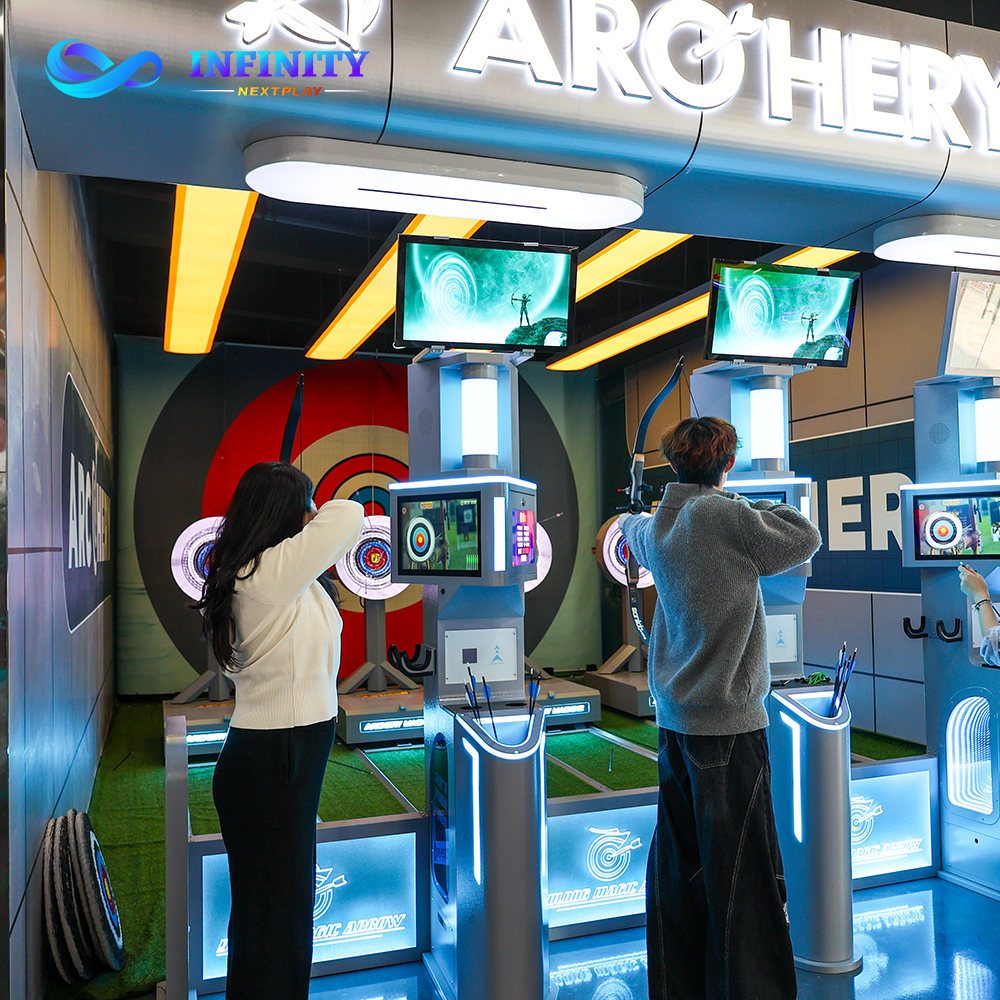
Two lane classes cover most venues. The Digital Archery Simulator A4 is the compact club format: shooting distance adapts from 5 meters to 8 meters and beyond, and dual screens keep both the target face and your running score visible without turning your head. The Professional Arcade Archery System A6 is the large-venue version, adding automatic voice scoring that calls out each arrow and 1-v-1 online matchmaking so you can shoot a rated match against a player on another machine entirely.
For scale, international indoor archery is shot at 18 meters on a 40-centimeter face with a ten-ring just 4 centimeters across. A simulator lane starting you at 5 meters is roughly a third of that distance - which is exactly why your second end looks nothing like your first.
Archery instruction worldwide converges on the same six steps, and coaching courses list them in this order: assume the shooting position, nock the arrow, draw and anchor, aim, release, follow through. Every problem a beginner has traces back to skipping one of them, so it is worth walking the full cycle once, slowly.
Feet shoulder-width apart, one foot on each side of the shooting line, body square or slightly open toward the target. Stand tall and still - the shot is built from the ground up, and a stance that shifts between arrows changes everything downstream. Your hips and shoulders stay quiet; the draw comes from the back and shoulder muscles, not the arm.
Clip the arrow to the string at the same spot every time and hold the bow with a relaxed, low-pressure grip - a death grip on the bow handle twists the whole bow on release. On a simulator lane the staff will usually hand you the bow already set up; your job is to repeat the same nock position arrow after arrow, because consistency at this step is what makes your groups tight.
Draw the string back to the same anchor point on your face - commonly the corner of the mouth or the jawbone - and touch it with your hand every single shot. The anchor is the most important idea in archery: it fixes the draw length and the sight picture to your body, so once you find an anchor that is comfortable and repeatable, claim it and keep it.
On a digital lane, aim the bow sight or the arrow tip at the ring you want and let your anchor do the rest. Two beginner-friendly aiming habits: aim at the center of the gold and let the scoring surprise you, and hold your aim for a full second before releasing - the most common beginner miss is releasing the instant the pin crosses the target.
A good release is a relaxation, not an action: open the fingers and let the string leave them. Plucking, flicking or punching the string sideways is the classic beginner fault, and it throws arrows low and to one side with impressive consistency. Think of it as letting go rather than letting fly.
Hold the position after the arrow is gone: drawing hand back near the anchor, bow arm extended, eyes on the target until the arrow lands. Movement during the last tenth of a second moves the arrow, and the follow through is simply the discipline of not moving. It is also the step that produces the satisfying thud-and-score rhythm that makes the game addictive.
Six steps, one sentence each, and the whole of archery technique. The shot cycle takes about five seconds; the sport is making those five seconds identical every time.
Simulator scoring uses the standard archery face: ten concentric rings, 10 points at the center stepping down to 1 at the outer edge, a miss scoring nothing. The system detects each arrow and posts the value instantly, and the lane totals your end automatically. Because every arrow is tracked, the leaderboard is always current - which matters in group play, where the scoreboard is half the fun.
Arrows are shot in ends - a fixed set shot before you walk up, collect arrows and reset. Simulator sessions commonly run ends of three arrows for matches and warm-ups, and longer ends of six for casual range time. A 15-30 minute session fits six to ten ends with comfortable gaps, and the pace is exactly why the game works for groups: while you shoot, the rest of your group watches a screen that updates after every arrow.
| Term | What It Means on the Lane |
|---|---|
| End | A set of 3-6 arrows shot before scores are tallied and arrows are retrieved |
| 10-ring face | The scoring face: 10 at center, stepping down by ring to 1, miss = 0 |
| Group | The cluster your arrows make; tight groups mean repeatable form |
| Leaderboard | The running score table on the lane screen, updated arrow by arrow |
| Tiebreak | One arrow each, closest to center wins - the sudden-death finish |
The competitive standard that the ring face comes from is worth knowing: World Archery indoor archery is shot at 18 meters on a 40-centimeter face, and at that distance the ten-ring measures just 4 centimeters across. When your lane calls a 10, you put an arrow into the equivalent of a drink coaster from across the room.
The modes below are what an A4 or A6 lane actually runs, in roughly the order a first session moves through them. Every mode sits on the same automatic 10-ring scoring; they change the shape of the game around it.

A note on choosing modes for your group: the first session of any group should stay in warm-up plus precision. Introduce moving targets and match play from the second session on - they land far better once everyone has felt a few 10s.
The set system used at international indoor events maps so naturally onto lane matches that many venues run it directly, and understanding it makes every head-to-head game on an A4/A6 lane more watchable. In set-system match play, each set is three arrows per archer. Win the set and you take two set points; draw it and you split, one each. First to a fixed number of set points wins the match, and a tied match goes to a tiebreak: one arrow each, closest to the center takes it.
That structure is why set-system matches swing so dramatically. An archer can lose the first set and still take the match with two strong ends, and the one-arrow tiebreak is the single loudest moment a lane produces - two archers, two arrows, and the whole room reading the same screen. Cumulative-score formats (compound style) run the other way: a fixed arrow count, highest total wins, no sets and no comeback drama - the purest test of who is sharper over fifteen straight arrows.
None of this requires a referee: the lane scores every arrow, calls every set and posts the running set points on the screen. That is the quiet advantage of running match play on digital equipment - the format carries the intensity, the hardware carries the rules.
Every fault below is common, visible on the scoreboard, and fixable inside one session - which is exactly why the game rewards a second visit so quickly.
| Beginner Mistake | What It Looks Like on the Scoreboard | The Fix |
|---|---|---|
| Releasing fast | Arrows scattered wide, scores jumping between ends | Hold the aim one full second before letting go |
| No consistent anchor | Groups drift up and down the face | Touch the same jaw point every draw |
| Gripping the bow hard | Arrows land left and right of the gold | Relax the bow hand; let the bow sit in the fingers |
| Dropping the bow arm early | Arrows land low | Follow through: hold the pose until the arrow lands |
| Skipping warm-up ends | First precision round is the worst of the session | Two warm-up ends before any scored game |
Family groups usually run the session the other way around: kids start at the nearest band with the lightest bow and cheer every ring, adults discover the game is harder than it looks, and by the last end the score gap has closed on its own. The family-format version of this is in the guide to indoor archery games for families and groups, and the placement of archery inside a full venue visit is in the sportainment games guide - where the aiming-game corner usually shares a wall with the lanes of a compact string bowling setup.
If you are reading this as an operator rather than a guest: the six-step shot is the whole reason this attraction holds groups without a coach on the floor - the lane automates scoring, safety flow and format rules, so staff only hand out bows and manage the line. Both lane classes and the full equipment context are on the sportainment equipment and solutions page, and a free 3D layout design will check whether an A4 or A6 configuration fits your floor. For the wider growth logic of the category, why sportainment keeps growing covers the demand side.
The questions first-timers actually ask at the line, answered in one breath each.
You shoot real soft-tipped arrows from a real bow at a digital 10-ring face: take a stance, nock, draw to an anchor point, aim, release and follow through. The lane scores every arrow automatically and runs the session through ends of 3-6 arrows.
Standard archery rings: 10 points at the center stepping down to 1 at the outer ring, miss scores nothing. The system detects each hit, totals each end and updates the leaderboard automatically.
Assume the shooting position, nock the arrow, draw and anchor, aim, release, follow through. Keeping those six steps identical shot after shot is the whole of archery technique.
Venue lanes typically adapt from 5 meters to 8 meters and beyond. For reference, international indoor archery is shot at 18 meters on a 40-centimeter face.
A set is three arrows per archer: win it for two set points, draw it for one. First to the target number of set points wins, and a tied match goes to a one-arrow tiebreak closest to center.
No. The bows are light, the distance starts at 5 meters, staff set up the lane, and the scoreboard gives instant feedback - most guests hit the face within their first end.
Both score automatically on a 10-ring face with adaptive distance. The A6 adds automatic voice scoring and 1-v-1 online matchmaking, and is built for larger venues where the lane plays to a crowd.
A typical session runs 15-30 minutes - six to ten ends of three to six arrows - and scales with group size and the modes you add.
Guests: book a lane, start at the 5-meter band, and let the mode ladder carry the session. Operators: the A4 digital archery lane and the A6 voice-scoring system are both on the sportainment equipment and solutions page, with a free 3D layout design to check the fit on your floor.